

Array Methods You Must Know - A Beginner's Guide
A beginner-friendly guide to understanding the most important JavaScript array methods with practical examples.
Hey there! 👋 If you are just starting with JavaScript, you might have heard the term "Array Methods" and felt a bit confused. Don't worry! Today, I am going to explain the most important array methods in a super simple way. By the end of this blog, you will be able to use these methods like a pro!
What is an Array?
Before we jump into array methods, let's quickly remember what an array is. An array is like a list where you can store many values together.
let fruits = ["Apple", "Banana", "Orange"];
Here, fruits is an array with three items. Now, let's learn how to work with these arrays using different methods!
1. push() and pop() - Adding and Removing from the End
What does push() do?
The push() method adds a new item to the END of an array. It's like adding something to the bottom of your to-do list.
Example:
let colors = ["Red", "Blue"];

console.log("Before push:", colors);
// Output: ["Red", "Blue"]

colors.push("Green");

console.log("After push:", colors);
// Output: ["Red", "Blue", "Green"]
What does pop() do?
The pop() method removes the LAST item from an array. It's like erasing the last item from your to-do list.
Example:
let colors = ["Red", "Blue", "Green"];

console.log("Before pop:", colors);
// Output: ["Red", "Blue", "Green"]

let removedColor = colors.pop();

console.log("After pop:", colors);
// Output: ["Red", "Blue"]

console.log("The removed color was:", removedColor);
// Output: The removed color was: Green
Try it yourself in the console! Open your browser, press F12, go to the console tab, and run these examples. You will see the magic happen!
2. shift() and unshift() - Adding and Removing from the Start
What does shift() do?
The shift() method removes the FIRST item from an array. It's like removing the first person from a queue.
Example:
let students = ["Alice", "Bob", "Charlie"];

console.log("Before shift:", students);
// Output: ["Alice", "Bob", "Charlie"]

let firstStudent = students.shift();

console.log("After shift:", students);
// Output: ["Bob", "Charlie"]

console.log("The student who left was:", firstStudent);
// Output: The student who left was: Alice
What does unshift() do?
The unshift() method adds a new item to the START of an array. It's like adding someone to the front of a queue.
Example:
let students = ["Bob", "Charlie"];

console.log("Before unshift:", students);
// Output: ["Bob", "Charlie"]

students.unshift("Alice");

console.log("After unshift:", students);
// Output: ["Alice", "Bob", "Charlie"]
Quick Comparison Table:
| Method | What it does | Example |
|---|---|---|
| push() | Adds to the END | array.push(item) |
| pop() | Removes from the END | array.pop() |
| shift() | Removes from the START | array.shift() |
| unshift() | Adds to the START | array.unshift(item) |
3. map() - Transform Every Item in an Array
What does map() do?
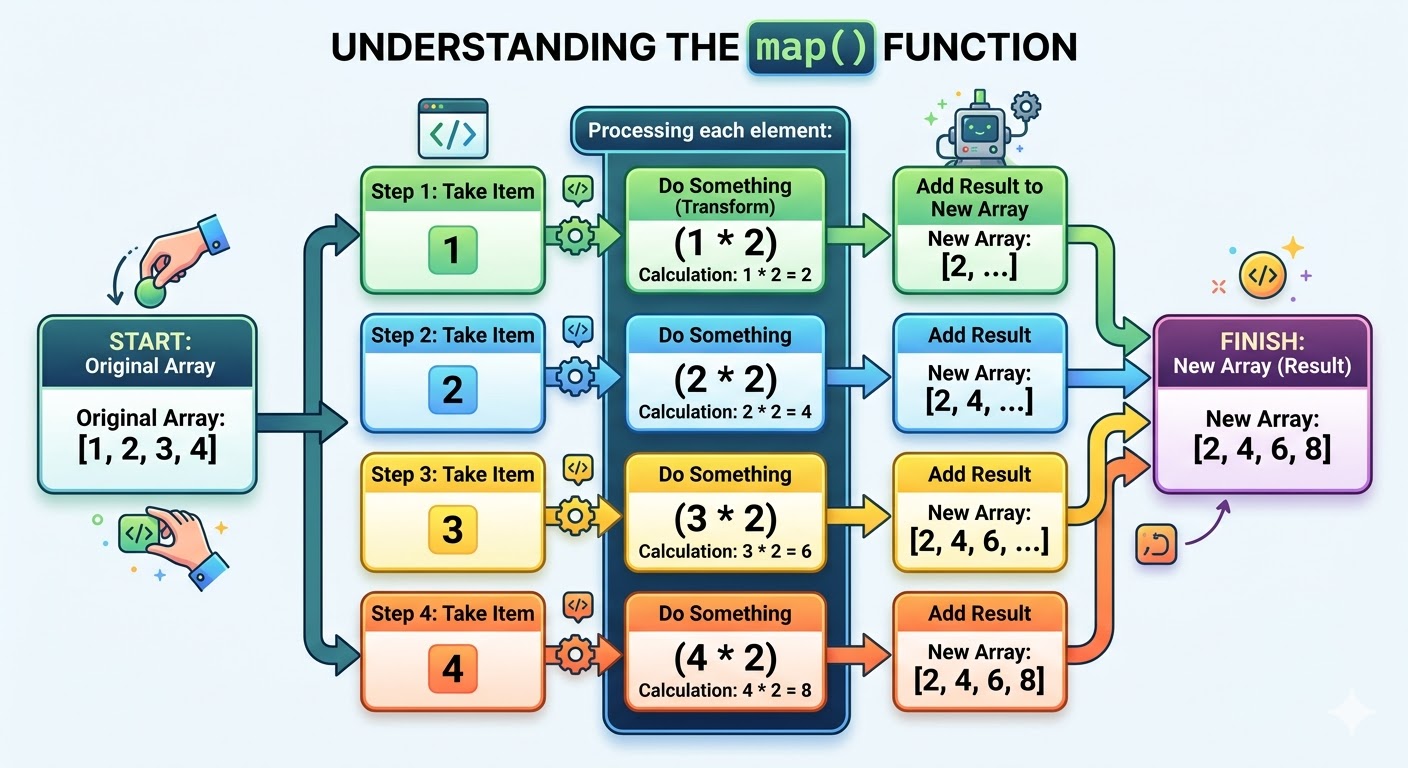
The map() method creates a NEW array by doing something to each item in the old array. It's like a machine that takes each apple and turns it into apple juice!
Simple Example:
Imagine you have a list of numbers and you want to double each number.
let numbers = [1, 2, 3, 4];

let doubledNumbers = numbers.map(function(num) {
  return num * 2;
});

console.log("Original array:", numbers);
// Output: [1, 2, 3, 4]

console.log("Doubled array:", doubledNumbers);
// Output: [2, 4, 6, 8]
Using Arrow Function (Shorter way):
let numbers = [1, 2, 3, 4];

let doubledNumbers = numbers.map(num => num * 2);

console.log(doubledNumbers);
// Output: [2, 4, 6, 8]
The Old Way vs The New Way
Let me show you how people used to do this with a for loop before map() existed:
Traditional For Loop:
let numbers = [1, 2, 3, 4];
let doubledNumbers = [];

for (let i = 0; i < numbers.length; i++) {
  doubledNumbers.push(numbers[i] * 2);
}

console.log(doubledNumbers);
// Output: [2, 4, 6, 8]
Using map() - Much Cleaner!:
let numbers = [1, 2, 3, 4];
let doubledNumbers = numbers.map(num => num * 2);

console.log(doubledNumbers);
// Output: [2, 4, 6, 8]
See how much shorter and cleaner map() is? That's why developers love it!
Real-World Example:
let prices = [100, 200, 300];

// Add 10% tax to each price
let pricesWithTax = prices.map(price => price * 1.10);

console.log(pricesWithTax);
// Output: [110, 220, 330]
4. filter() - Keep Only Items You Want
What does filter() do?
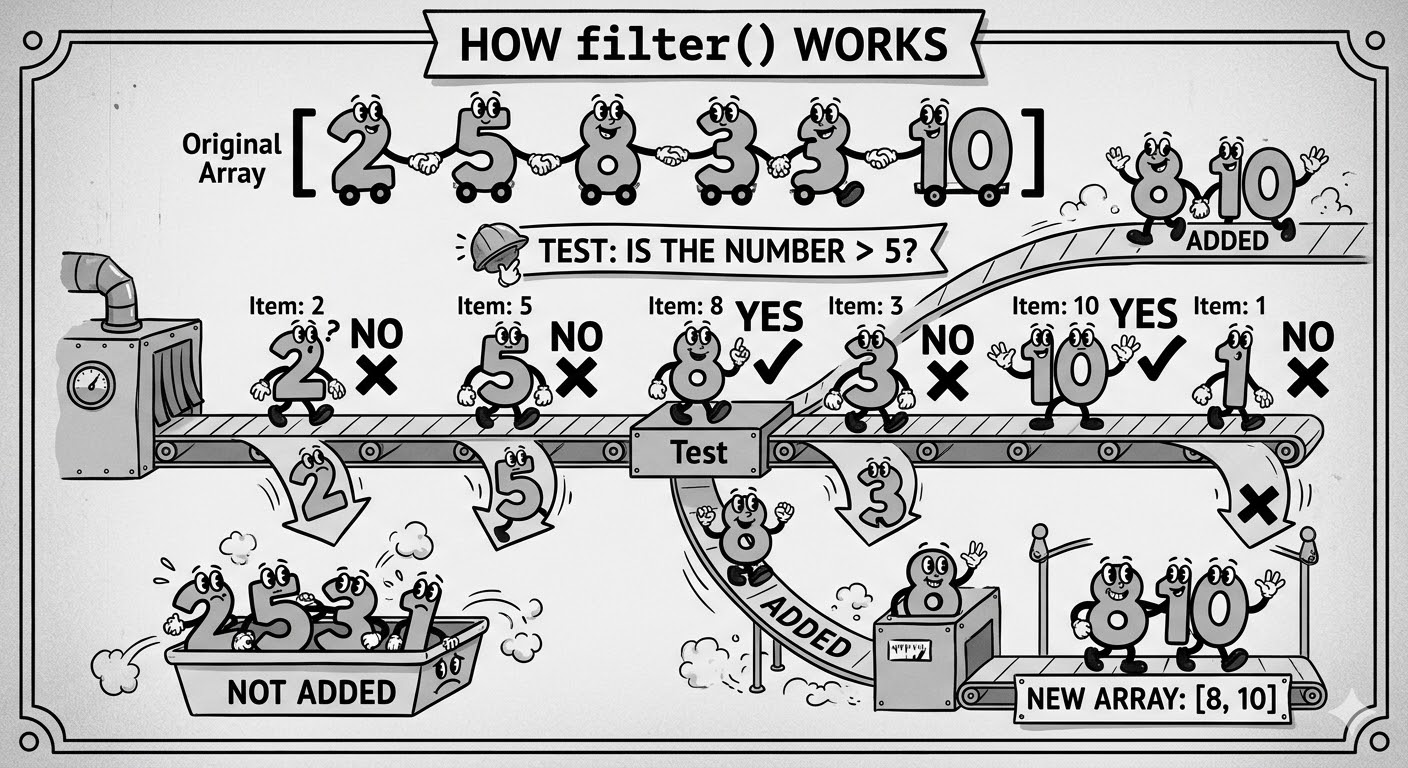
The filter() method creates a NEW array with only the items that pass a test. It's like sifting flour - you keep only what you need and throw away the rest!
Simple Example:
Imagine you have a list of numbers and you only want numbers greater than 5.
let numbers = [2, 5, 8, 3, 10, 1];

let bigNumbers = numbers.filter(function(num) {
  return num > 5;
});

console.log("Original array:", numbers);
// Output: [2, 5, 8, 3, 10, 1]

console.log("Filtered array:", bigNumbers);
// Output: [8, 10]
Using Arrow Function (Shorter way):
let numbers = [2, 5, 8, 3, 10, 1];
let bigNumbers = numbers.filter(num => num > 5);

console.log(bigNumbers);
// Output: [8, 10]
The Old Way vs The New Way
Traditional For Loop:
let numbers = [2, 5, 8, 3, 10, 1];
let bigNumbers = [];

for (let i = 0; i < numbers.length; i++) {
  if (numbers[i] > 5) {
    bigNumbers.push(numbers[i]);
  }
}

console.log(bigNumbers);
// Output: [8, 10]
Using filter() - Much Cleaner!:
let numbers = [2, 5, 8, 3, 10, 1];
let bigNumbers = numbers.filter(num => num > 5);

console.log(bigNumbers);
// Output: [8, 10]
Again, filter() is so much cleaner!
Real-World Example:
let students = [
  { name: "Ali", score: 45 },
  { name: "Sara", score: 82 },
  { name: "Khan", score: 35 },
  { name: "Zara", score: 90 }
];

// Get only students who passed (score >= 50)
let passed = students.filter(student => student.score >= 50);

console.log(passed);
// Output:
// [
//   { name: "Sara", score: 82 },
//   { name: "Zara", score: 90 }
// ]
5. forEach() - Do Something With Each Item
What does forEach() do?
The forEach() method lets you do something with each item in an array. It doesn't create a new array like map() - it just performs an action on each item.
Simple Example:
let fruits = ["Apple", "Banana", "Orange"];

fruits.forEach(function(fruit) {
  console.log("I like " + fruit);
});

// Output:
// I like Apple
// I like Banana
// I like Orange
Using Arrow Function (Shorter way):
let fruits = ["Apple", "Banana", "Orange"];

fruits.forEach(fruit => console.log("I like " + fruit));

// Output:
// I like Apple
// I like Banana
// I like Orange
The Old Way vs The New Way
Traditional For Loop:
let fruits = ["Apple", "Banana", "Orange"];

for (let i = 0; i < fruits.length; i++) {
  console.log("I like " + fruits[i]);
}
Using forEach() - Cleaner!:
let fruits = ["Apple", "Banana", "Orange"];

fruits.forEach(fruit => console.log("I like " + fruit));
Key Difference:
map()creates a new array with changed itemsforEach()just does something with each item (no new array)
// Using map() - creates new array
let numbers = [1, 2, 3];
let doubled = numbers.map(num => num * 2);
console.log(doubled); // [2, 4, 6] - NEW ARRAY created

// Using forEach() - no new array
let numbers = [1, 2, 3];
numbers.forEach(num => console.log(num * 2));
// 2, 4, 6 are printed but NO NEW ARRAY is created
6. reduce() - Combine All Items Into One Value
What does reduce() do?
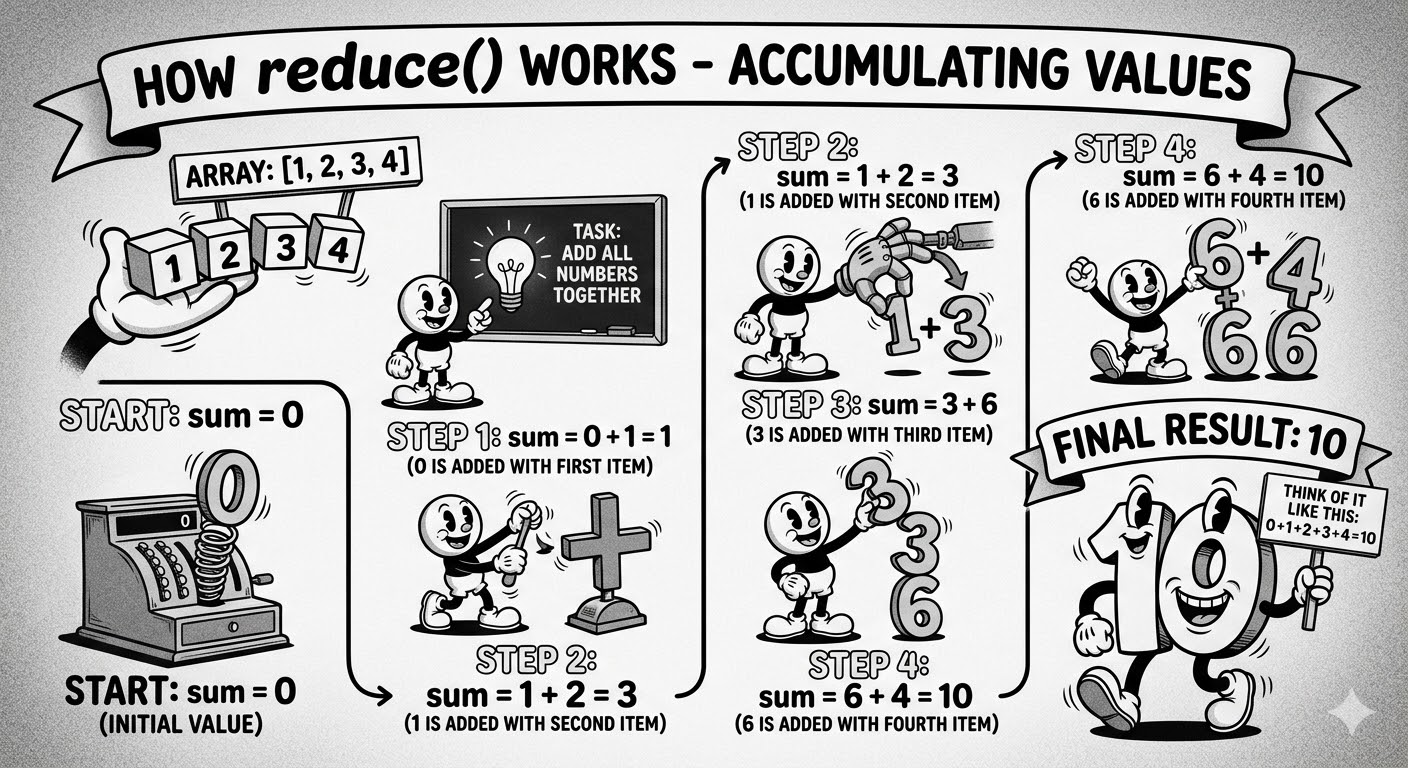
The reduce() method takes all items in an array and combines them into a single value. It's like adding all your coins to get the total money!
Simple Example - Adding Numbers:
let numbers = [1, 2, 3, 4];

let total = numbers.reduce(function(sum, num) {
  return sum + num;
});

console.log(total);
// Output: 10
Using Arrow Function:
let numbers = [1, 2, 3, 4];
let total = numbers.reduce((sum, num) => sum + num);

console.log(total);
// Output: 10
How reduce() Works Step by Step
Real-World Example - Calculating Total Price:
let prices = [100, 200, 150, 75];

let totalPrice = prices.reduce((total, price) => total + price);

console.log("Total Price: " + totalPrice);
// Output: Total Price: 525
Another Example - Finding the Biggest Number:
let scores = [45, 89, 23, 95, 67];

let highestScore = scores.reduce((max, score) => {
  if (score > max) {
    return score;
  } else {
    return max;
  }
});

console.log("Highest Score: " + highestScore);
// Output: Highest Score: 95
Quick Summary
Here's a quick table to remember all these methods:
| Method | What it does | Creates new array? | Example |
|---|---|---|---|
| push() | Adds item to END | No (modifies original) | array.push(5) |
| pop() | Removes from END | No (modifies original) | array.pop() |
| shift() | Removes from START | No (modifies original) | array.shift() |
| unshift() | Adds to START | No (modifies original) | array.unshift(5) |
| map() | Changes each item | YES | array.map(x => x * 2) |
| filter() | Keeps certain items | YES | array.filter(x => x > 5) |
| forEach() | Does something with each | No | array.forEach(x => console.log(x)) |
| reduce() | Combines into one value | NO | array.reduce((a,b) => a + b) |
Keep practicing, and soon these methods will become second nature to you. Happy coding!


