

Understanding Async Code in Node.js
From confusing callbacks to clean promises — explained simply with real examples and clear diagrams.
Section 01
Why Does Async Code Even Exist?
Imagine you walk into a coffee shop and order a latte. The barista doesn't freeze everyone in the shop while making your drink. They take your order, start making it, and meanwhile serve others. That's exactly what async code does in Node.js — it keeps things moving.
Node.js is single-threaded. This means it can only do one thing at a time. But many tasks — like reading files, fetching data from a server, or querying a database — take time. Without async, your entire app would freeze while waiting.
Let's say you want to read a file from your hard disk. Your hard disk is much slower than your CPU. If Node.js waited for the file to fully load before doing anything else, every other user request would be blocked. That's terrible for performance.
Async code solves this by saying: "Start reading the file, and call me back when you're done." In the meantime, Node.js handles other tasks. This is why async is not just a feature — it is the core of how Node.js works.
Section 02
Callback-Based Async Execution
The original way Node.js handled async was through callbacks. A callback is simply a function that you pass to another function, telling it: "When you're done, run this."
📁 The File Reading Scenario
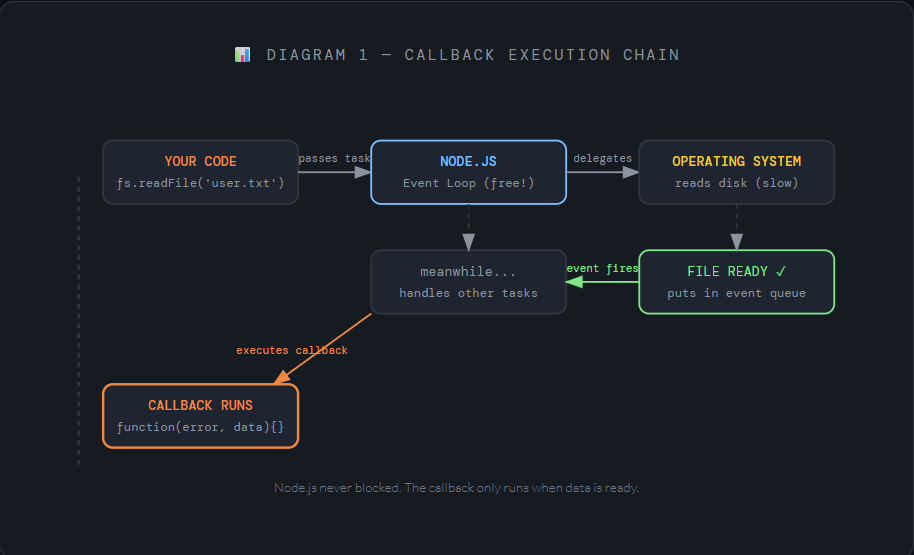
Let's use a real example — reading a file. Here's how it works step-by-step:
You call fs.readFile()
Node.js receives your request to read a file called user.txt.
Node.js hands it off
The file reading is passed to the operating system. Node.js does NOT wait — it moves on.
File is ready
When the OS finishes reading, it places the result in the event queue.
Your callback runs
Node.js picks up the result and runs your callback function with the file data.
const fs = require('fs');

// Step 1: Tell Node.js to read the file
fs.readFile('user.txt', 'utf8', function(error, data) {

  // Step 4: This runs ONLY when the file is ready
  if (error) {
    console.log('Something went wrong:', error);
    return;
  }
  console.log('File content:', data);

});

// Step 2 & 3: This runs BEFORE the file is ready!
console.log('Reading file... Node.js is free to do other things.');
Notice the magic here — the last console.log runs before the file is read. That is async in action.
Section 03
The Problem: Nested Callbacks
Callbacks seem simple at first. But what happens when one async task depends on another? You end up nesting callbacks inside callbacks — and this gets messy very fast.
⚠️ Callback Hell — When you nest multiple callbacks, the code drifts so far to the right that it becomes nearly impossible to read, debug, or maintain. Developers jokingly call this the "pyramid of doom."
Let's say you need to: read a file → get the username → fetch their profile → save logs. With callbacks, this is what it looks like:
fs.readFile('user.txt', 'utf8', function(err, userId) {
  if (err) return handleError(err);

  getUser(userId, function(err, user) {
    if (err) return handleError(err);

    getProfile(user, function(err, profile) {
      if (err) return handleError(err);

        saveLog(profile, function(err) {
          if (err) return handleError(err);

            // We're so deep now... hard to read!
            console.log('All done!');
        });
    });
  });
});
See the problem? Each task shifts the code further right. You also have to repeat the error-check (if (err)) over and over. This is fragile, hard to maintain, and very difficult to reason about.
Section 04
Promise-Based Async Handling
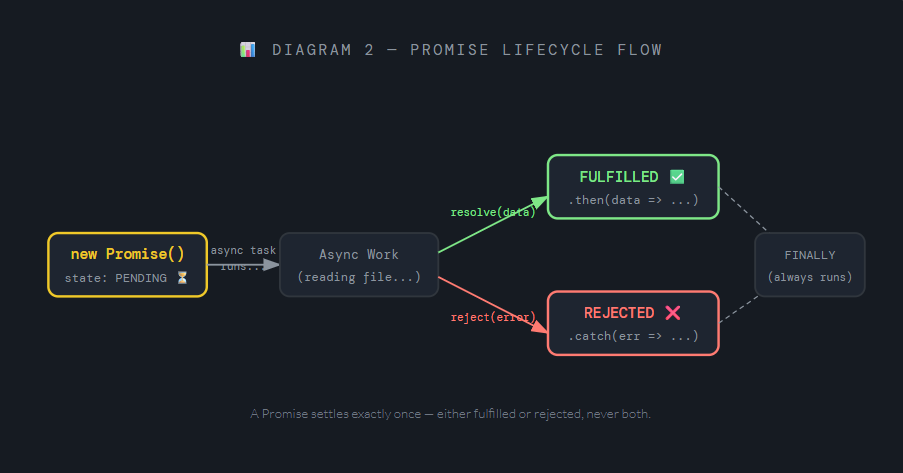
A Promise is an object that represents a task that will finish in the future. Think of it like a restaurant buzzer — you get a device when you order, and it buzzes when your food is ready. You can go sit down and relax. You know you'll get a result.
A Promise has three possible states:
⏳ Pending — The task is still running
✅ Fulfilled — The task finished successfully
❌ Rejected — The task failed with an error
The Same File Example — With Promises
Let's rewrite the file reading example using Promises. First, here's creating a promise manually:
const fs = require('fs');

// Wrap the callback-based function in a Promise
function readFilePromise(filename) {
  return new Promise((resolve, reject) => {
    fs.readFile(filename, 'utf8', (error, data) => {
      if (error) reject(error);  // Task failed
      else resolve(data);       // Task succeeded
    });
  });
}

// Now use it — clean and readable!
readFilePromise('user.txt')
  .then(data => {
    console.log('File content:', data);
  })
  .catch(error => {
    console.log('Error:', error);
  });
Chaining Promises — No More Pyramid!
Now let's solve the callback hell problem from earlier. With Promises, we can chain tasks:
readFilePromise('user.txt')
  .then(userId => getUser(userId))
  .then(user   => getProfile(user))
  .then(profile => saveLog(profile))
  .then(() => console.log('All done!'))
  .catch(error => console.log('Error:', error));
  // One .catch() handles ALL errors above
Beautiful! The code reads top-to-bottom like a story. One single .catch() handles errors from any step in the chain.
Section 05
Callback vs Promise — Side by Side
Here's the same task written both ways. See for yourself which is easier to read:
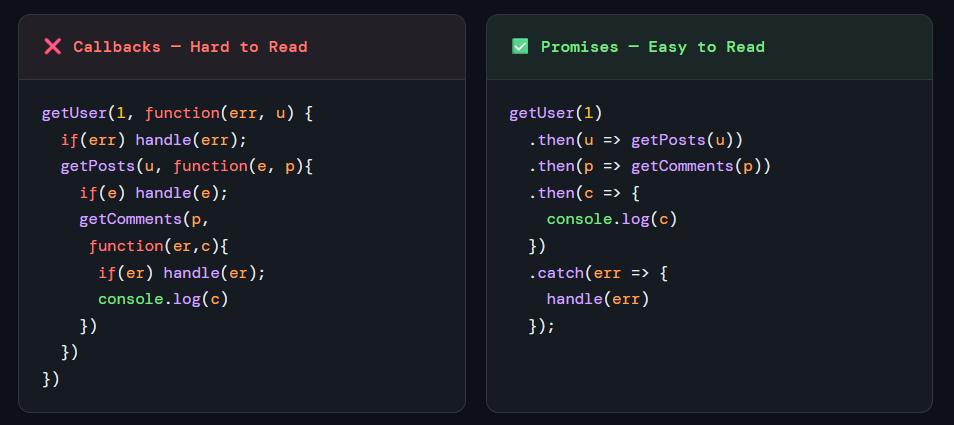
Same result. Same tasks. But the Promise version is dramatically easier to understand.
Section 06
Benefits of Promises
📖
Readable Code
Promises chain vertically using.then(), so your code reads like a clean list of steps — no rightward drift.🛡️
Centralized Error Handling
One.catch()at the end catches errors from every step in the chain. With callbacks, you had to repeat the error check in every single function.🔗
Easy Chaining
Each.then()returns a new Promise. This makes it trivial to run tasks one after the other, passing results from one step to the next.⚡
Parallel Execution with Promise.all()
Need to run multiple async tasks at the same time?Promise.all([task1, task2])runs them in parallel and waits for all of them to finish.🧹
Better Debugging
Stack traces with Promises are cleaner and easier to trace back to where the error happened, compared to nested callback errors.🚀
Gateway to Async/Await
Promises are the foundation of the modernasync/awaitsyntax, which makes async code look almost exactly like regular synchronous code.
Bonus Tip: Modern Node.js has a built-in
fs.promises.readFile()— no need to manually wrap anything! It returns a Promise out of the box.
const data = await fs.promises.readFile('user.txt', 'utf8');
If you understood this article, you're ready to explore async/await — the modern sugar on top of Promises that makes async code look like it's synchronous. That's a great next step!


